
Technical SEO Audit Checklist for Publisher Websites
4th Nov 2026
21 min read
By Shubham Joshi

Is your publisher website at a crossroads where publishing more articles is no longer translating into the organic visibility and traffic you're aiming for?
As publishing volumes grow, technical issues involving crawlability, indexation, URL management, and site performance can make it harder for search engines to discover and understand important content.
A technical SEO audit can help you identify these roadblocks, understand their impact, and focus on the right fixes.
Key Takeaways
Identify unnecessary URL variations and focus on helping search engines discover your most important content
Check all internal links, sitemap updates, indexation directives, and canonical tags whenever you publish new articles.
Keep useful category and archive pages accessible when you review thin, overlapping, or low-value URL patterns.
Align canonical tags, internal links, metadata, and structured data with the intended page URL and content.
Monitor Core Web Vitals, mobile rendering, page weight, and server stability during traffic spikes.
What is “Publisher SEO” - and how it is different from "Traditional SEO”
Publisher SEO is the practice of optimizing the content of publishing websites like newspaper, magazines, media, and sports publications that covers news, events, and evergreen guides, affiliate content and everything else that’s in between.
For any business, the ultimate goal is to earn “REVENUE”, and publishers are no different here.
Your job as an SEO professional is to drive high-quality traffic to these pages.
The importance of search visibility is becoming more evident as publisher traffic patterns change. According to the Reuters Institute’s 2026 report, Google organic search traffic to over 2,500 websites declined by 33% globally between November 2024 and November 2025.
This highlights why publishers need to pay close attention to how their content is discovered and accessed through search.
Whether it is through optimizing headlines, creating evergreen content or event plans, or working on improving the overall technical SEO, what needs attention depends on where they stand with regard to search results.
Traditional SEO vs Publisher SEO: What Makes Both Different?
While traditional SEO and publisher SEO share the same fundamentals, publishing websites face a different set of technical roadblocks.
News websites publish hundreds of articles in a single day, update stories regularly, and maintain archives that contain years of content - all of which can make crawlability, indexation, URL management, and content discovery an important puzzle to nail.
SEO Consideration | Traditional Business Website | Publisher Website |
Publishing Frequency | SEO professionals publish content on a periodic basis | News channels publish hundreds of news articles daily |
Crawl Management | The focus is on important service and content pages | Needs to manage a large number of frequently changing pages |
Indexation | Prioritizes key landing pages and resources | Must help search engines discover new stories while also managing older content/archives |
Site architecture | It is structured around services and products | Publisher websites have lots of articles/pages, so creating and managing site architecture becomes difficult compared to traditional business. |
Content discovery | Depends on search and other traffic acquisition channels | Relies on Google News, Discover, and Top Stories |
Technical priorities | Site performance, indexation, and site structure | Crawl efficiency, timely discovery, news sitemaps, archives, and performance |
The above listed difference can make technical SEO a must-do for a publisher.
A problem in any one of these can affect hundreds or even thousands of pages and not just one single page - but the essential key is to identify these errors early on to save search engines from limiting your website’s visibility, make indexing faster, and improve ranking in Google SERPs.
10 Must-Achieve Technical SEO Audit Checkpoints for Publisher Websites
For publishers, technical SEO is not limited to just making your website crawlable.
It is about making sure your website is easy for search engines to find new articles, understand important pages, and access the content that deserves to appear in search results.
Technical SEO can affect an entire group of URLs rather than an individual article if it is not managed properly.
For example, an incorrect canonical tag in an article template can affect multiple pages, while poorly managed URL parameters can create unnecessary crawling.
Below is the list of 10 vital technical SEO checkpoints that publishers should include in their audits.
1. Crawl Budget and URL Management
Why this is important
The publisher website includes thousands of URLs created by articles, categories, tags, author pages, search filters, and archives.
When unnecessary URL variations are collected, search engines may spend time crawling pages that offer little additional value instead of discovering important content with efficiency.
However, a crawl budget is not automatically a problem for every publisher. Google identifies this as a more relevant consideration for websites that update more frequently, consisting of sites with a substantial number of pages and URLs that are reported as discovered but not indexed.
What does the data say about crawl budget
According to Google’s crawl budget documentation, crawl-budget optimization may be relevant to sites with 10,000 unique pages that change daily, or more than 1 million unique pages that are updated roughly every week.
These are just examples and not a fixed threshold. For publishers, what’s important is to review their own crawl activity, indexing report, and publishing frequency before you decide whether crawl budget is a major problem.
What needs to be audited
URL parameters that generate multiple versions of the same page.
Duplicate URLs that are created by filters, tracking parameters, or sort options.
A big number of low-value URLs are being crawled.
Important content that is difficult to find through internal links.
Any server response issues, if any (to prevent Googlebot’s ability to crawl the site).
How to fix crawl budget
The fixing process should start with identifying which URLs are important for the user and which create redundant pages. You should review crawl data, internal links, and indexation reports before making changes to crawl directives.
Wherever appropriate, consolidate any duplicate URLs with the help of canonical tags, prevent unnecessary URL generation, and use Robots.txt to define which URLs Google bots should crawl and which it should avoid.
Tools to use - Google Search Console, Screaming Frog SEO Spider, and server log analysis.
2. Article Crawlability and Indexation
Why this is important
Publishing an article is not a guarantee that Google will crawl or index it. An article might remain undiscovered if it has very few internal links, if it is blocked by a technical directive, or is crawled but not chosen for indexing.
For publishers covering breaking news, these problems need genuine attention because the value of an article can depend only on how fast the reader discovers it.
For example, think of a website that publishes an article about a major cricket match just after it ends - but fails to interlink it with a homepage or any relevant category page, as well as forgets to update the XML sitemap to include the new URL.
As a result, Google may take longer to discover the article. By the time it gets crawled and indexed, readers might have already searched for matching results and analysis from another publisher.
This is the reason why publishers should ensure that newly published articles are accessible through internal links, included in up-to-date sitemaps, and free from any unintended crawling or blocking restrictions.
What needs to be audited
Check whether the newly published article is accessible to Googlebot
Ensure important article URLs return the correct HTTP status code
Do check if any robots.txt or noindex directive blocks important content.
Check whether any canonical tags point to the intended article URL
Whether new articles are linked from relevant category pages, homepages, or related stories.
How to fix article crawlability and indexation
You can fix these issues with the help of URL inspection in Google Search Console by investigating URLs.
Check live page, indexing eligibility, canonical selection, and rendered content. Review article templates and internal linking when the same issue impacts more than one URL.
In case of large batches of new or updated articles, it is necessary to maintain sitemaps accurately and identify patterns rather than simply relying on individual requests; a sitemap submission and recrawl requests do not guarantee indexing.
Tools to use - Google Search Console, URL inspection, and technical SEO crawler.
3. XML Sitemaps and Google News Sitemaps
Why this is important
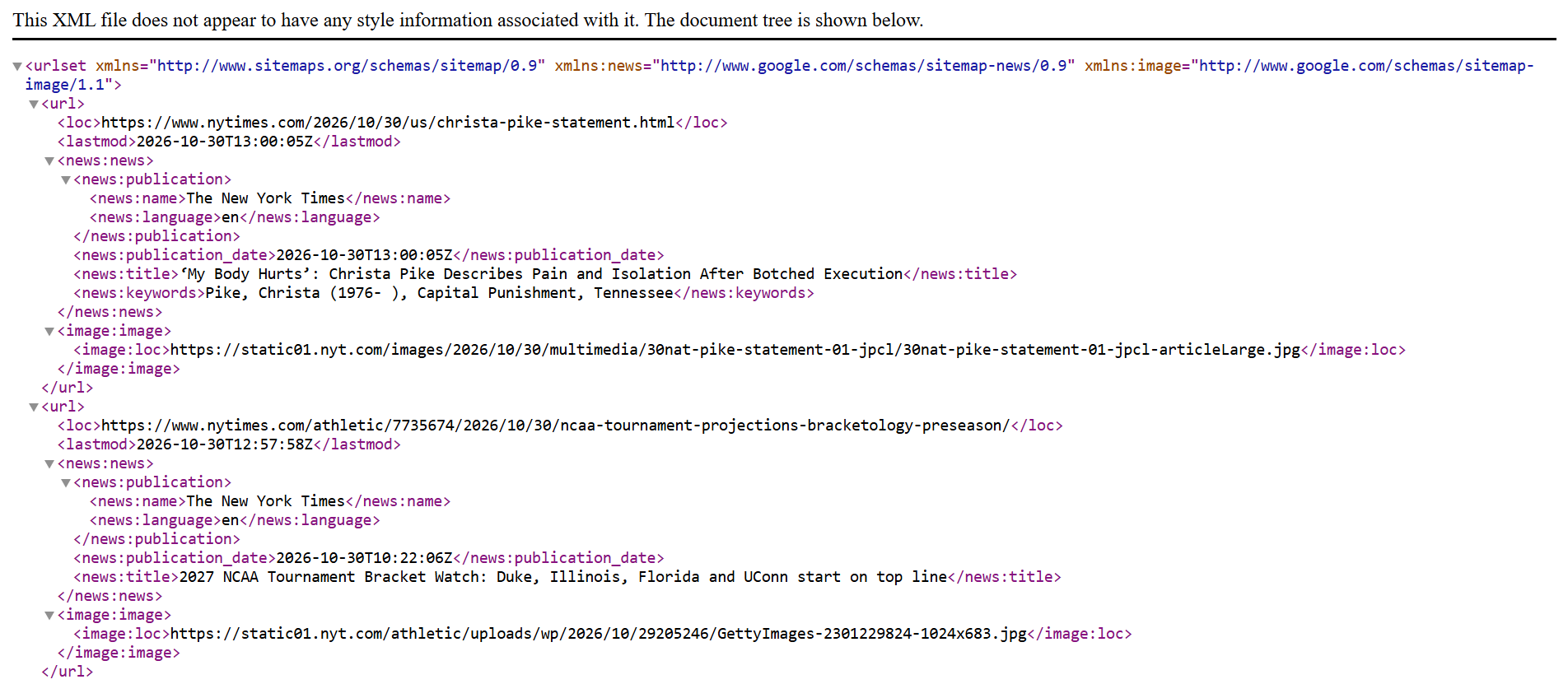
XML sitemaps can help search engines discover important URLs, which are useful for publishers who add or update content regularly.
A news sitemap can provide Google News with information about recently published articles. It is a discovery aid, not a guarantee that every listed URL will be indexed.
Publishers should maintain two types of sitemaps: XML sitemaps (sitemap.xml) for search engines, HTML sitemaps (sitemap.html) to help visitors navigate the website. Keeping these sitemaps updated and including the correct canonical URLs helps search engines discover the content publishers want them to find.
Separating news content from regular website URLs can also make sitemap management easier.
What needs to be audited
You should check if your site XML sitemaps include canonical URLs that need indexing.
Also, check if there are any redirections, broken, or noindex URLs.
Whether new articles appear in the sitemap promptly.
Ensure your sitemap follows all the necessary Google requirements for recent articles.
Lastly, check whether the sitemap’s reported last-modified date reflects meaningful updates.
How to fix XML and Google Sitemaps
Fixing sitemap issues starts by keeping sitemaps updated and including a list of URLs you want search engines and LLMs to crawl.
For a news sitemap, Google suggests including articles published in the last two days and removing any older URLs from the news-specific portion or its metadata. Older articles can remain in regular XML sitemaps where appropriate.
Having a separate news sitemap can also make it easier to monitor news content in the Search Console.
Tools to use - Google Search Console, XML sitemap validators, and crawler sitemap reports.
4. Archive Pages, Pagination and Category Structure

Why this is important
Publisher websites use category pages, tags, author archives and paginated listings to organise large volumes of content.
When these structures are poorly managed, important stories may become difficult to find, while low-value archive combinations can create excessive URL variation.
Remember the thumb rule: Not every archive page should be blocked or removed from search results automatically. The right approach is to check whether the page serves a useful purpose and provides any distinct experience.
What needs to be audited
Check all useful links and archive pages for relevant articles
Crawlable pagination links that can help search engines discover older content
Any canonical tags and indexation directives that align with the intended page strategy
Identify thin or overlapping tag pages that offer little unique value
How to fix archive pages, pagination and category structure
Keep all your useful pages accessible and ensure paginated listings provide crawlable links to all subsequent pages. Consolidate or restrict a low-value archive page only after evaluating its purpose, content, and overall organic performance.
For an infinite-scroll experience, provide a crawlable paginated structure so search engines can find additional content. Google states that it might have difficulty scrolling through infinite-scroll pages in the same way a user does.
Tools to use - Screaming Frog, Google Search Console, and analytics or landing page performance reports.
5. Internal Linking and Article Discovery
Why this is important
Internal links can help search engines find pages and understand how your content is connected.
For news publishers, this is immediately important when new stories need to be discovered quickly, and evergreen articles are intended to attract visitors after publication date.
A story that is linked only from a temporary homepage position might seem harder to discover once a new article/story replaces it.
Let’s understand this with a real example.
A search engine journal case study on publisher internal linking checked how a homepage redesign at independent.ie impacted internal links to articles and search visibility.
The example highlights why publishers should review internal linking during homepage redesigns and any template changes. When a share template changes, the impact can extend beyond one article to multiple URLs across the website.
What needs to be audited
Ensure that internal links point to newly published articles from relevant categories and related stories.
Check important articles that are buried several clicks away from the homepage.
Find if there are any broken, redirected, or non-canonical URLs used in the internal links.
Related-story modules that generate irrelevant or repetitive links.
How to fix internal links and article directory
Create a consistent internal linking process for your editorial team - and link any related story naturally, maintain context, maintain useful category hubs, and preserve pathways to important evergreen content.
Review internal linking templates as well as individual articles. One single template change can remove links across hundreds of pages, making the impact look much broader than an isolated editorial mistake.
Tools to use - Screaming Frog, Sitebulb, Google Search Console, and internal link reports.
6. Canonical Tags and Duplicate Content
Why this is important
Publishers can create multiple URLs for similar or identical content through tracking parameters, print versions, pagination, syndication, or an alternative URL structure.
This makes it difficult for search engines to identify which version should appear in the SERPs.
Canonical tags can indicate the preferred URL, helping search engines consolidate signals around the intended pages.
However, they are a signal rather than a directive, so internal links, sitemaps, and redirects should also point consistently to the preferred URL.
What needs to be audited
Ensure correct URLs are given to important articles.
Check for consistency between sitemap URLs, internal links, and canonical tags.
Appropriate canonical handling for any republished or syndicated content.
Duplicate URL variations created by parameters and filters.
How to fix canonical tags and duplicate content
Begin by using consistent canonical tags, link internally to preferred URLs, and include canonical URLs in the sitemap. Also, avoid applying a blanket canonical rule to all pages in a category or archive since these pages may serve different purposes.
You should also check for any canonical conflicts at the template level. A single incorrect template rule may impact a large number of articles.
Tools to use - Google Search Console URL inspection, Screaming Frog, and source-code inspection.
7. Article Structured Data and Metadata
Why this is important
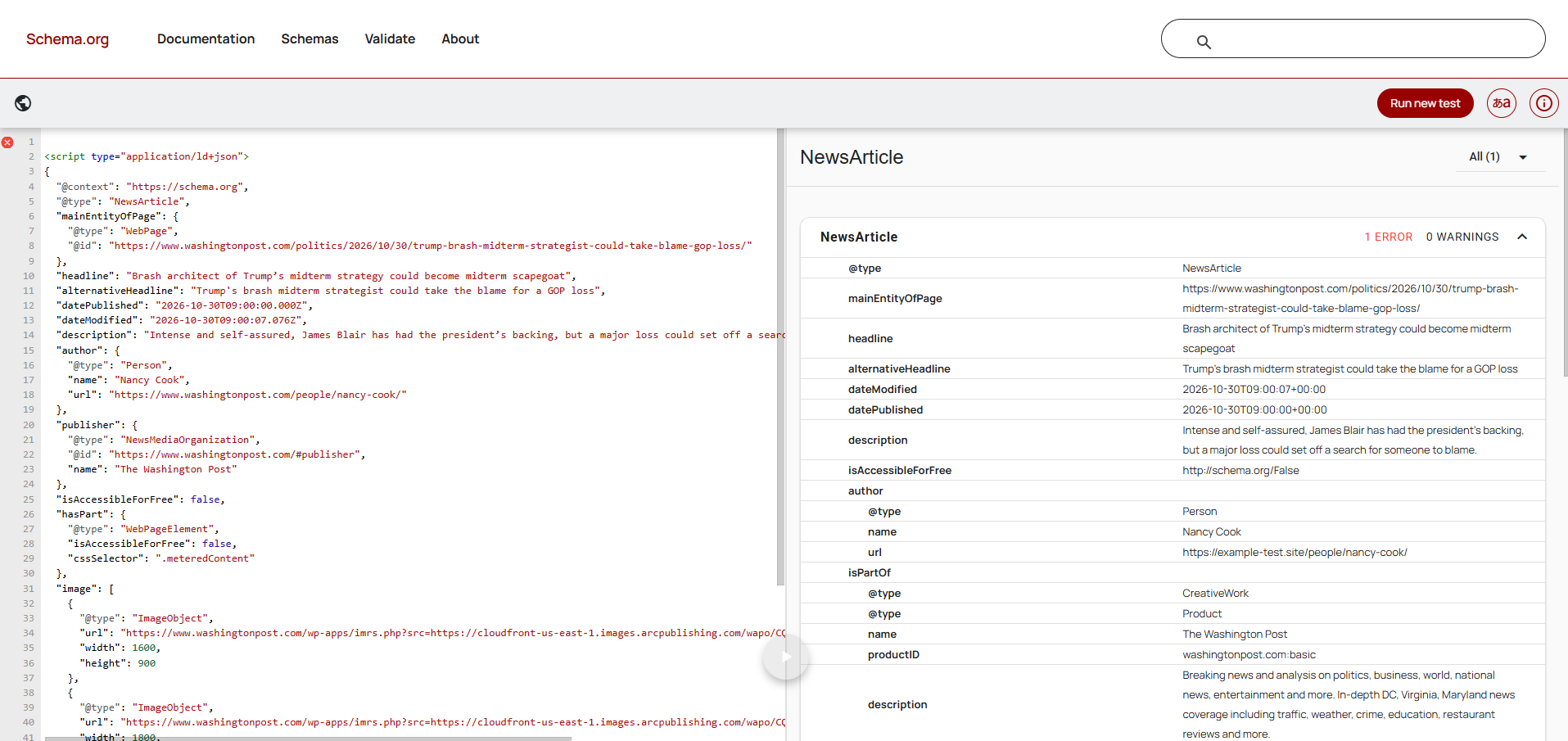
Article structured data can help Google to understand details like article’s headline, image, author, and publication or modification date.
It is helpful for news, magazine and sports publishers, particularly when the information is implemented consistently across various article templates.
Structure data does not guarantee higher rankings or placement in Top stories.
Let’s dive into an example to understand this better.
Google’s published case study on ABP network describes how the Indian publisher implemented video SEO best practices across eight regional languages. ABP reported 30% growth in traffic from Google after improving the discoverability of its video content.
What needs to be audited
Check appropriate Article, NewsArticle or BlogPosting structured data on all relevant pages
Do check if consistency is maintained between structured data and visible headlines, images and author details and dates
Identify and search for any kind of error, warnings, or missing required fields in the markup.
Accurate publication and modification timestamps.
How to fix article structure data and metadata
Implement the structured data type that can describe the page. Keep the markup consistent across visible content and ensure dates, author details and image all align and are maintained when articles are updated.
You should also validate representative templates and test the pages after significant CMS changes.
Tools to use - Google Rich Results Test, Schema Markup, Validator, and Google Search Console.
8. Core Web Vitals and Server Performance
Why this is important
A publisher needs to deliver a fast and stable experience to readers, especially when daily traffic peaks when slow loading, layout shifts, or server issues impact user experience and content discovery.
With the help of core web vitals, publishers can monitor loading performance, responsiveness and visual stability.
The 2025 Web Almanac by HTTP Archive reported that 48% of mobile websites and 56% of desktop websites achieved good overall Core Web Vitals results.
It also found 57% of mobile homepages weighing less than 1 MB passed Core Web Vitals, compared with 30% of homepages weighing 5 MB or more.
While these figures cover websites across the web, they highlight why publishers should review heavy images, advertising scripts, and third-party tools that can slow down article pages, particularly on mobile devices.
What needs to be audited
Check for vitals like largest contentful paint (i.e. LCP), Interaction to Next paint (i.e. INP), Cumulative Layout Shift (i.e. CLS).
You should also check how your website renders on mobile and loading behavior of article-templates.
Server response times during normal traffic and traffic spikes.
How to fix core web vitals and server performance
Start and focus on making fixes based on real-user performance data. Optimize the main article image, reduce any unnecessary JavScript, reserve space for advertisements and embeds, and test your server capacity when traffic increases.
Use field data to understand the reader experience and laboratory tests to diagnose if there are any specific roadblocks.
Tools to use - PageSpeed Insights, Chrome UX Report, Lighthouse and Google Search Console’s Core Web Vitals report.
9. Google Discover and Top Stories Readiness
Why this is important
Being in the News and Media industry, publishers have opportunities to earn traffic from Google Discover and Top stories in addition to standard organic search results.
Technical checks can help ensure articles and images are eligible to be considered, but no technical setup will guarantee visibility in either experience.
Google discover also relies on the relevance and appeal of content and individual users, so traffic fluctuations should not be attributed to technical SEO automatically.
What needs to be audited
Audit your websites indexing eligibility and Google accessibility of important articles
Do check for image quality, resolution, and suitability for prominent previews.
Discover and search performance trends alongside technical changes, publication schedules, and article topics.
How to fix Google Discover and Top Stories
Use a compelling, accurate headline and relevant high-resource images. Google suggests using an image that is at least 1200 pixels wide for Discover previews, alongside allowing for large image previews with max-image-preview:large or using AMP.
Review Discover performance in Search Console and compare traffic patterns with your publishing schedule, article topic and site changes. Treat these reports as diagnostic evidence and not as proof that a single technical issue will cause a traffic drop.
Tools to use - Google Search Console Discover report, URL inspection, and structured data testing tool.
10. Robots Directives, Redirects, and Technical Monitoring
Why this is important
We have seen how a little amount of salt if sprinkled more or less can spoil the taste of food. In the similar way, a small error in technical configuration can impact an entire publisher URL.
An accidental noindex directive, incorrect robots.txt rules, or a redirect applied to a wrong article can prevent important pages from appearing as it was intended.
Publishers need to monitor processes because website changes and publishing systems can introduce new errors over time.
What needs to be audited
Audit robot.txt rules clearly set up to prevent blocking important pages or resources.
Look, redirect destinations and chains are defined correctly.
Widespread errors introduced by recent CMS or template changes.
Sudden changes in indexation, crawl errors, and organic performance reported in Search Console.
How to fix Robots Directives, redirect and technical monitoring
Review directives and redirects against the intended indexing strategy. Use permanent redirects for URLs that are moved permanently, and returns an appropriate not-found status for pages that were genuinely removed without any replacement.
Build a routine checks system in the publishing workflow. Monitor key URL groups and investigate sudden changes after the deployment instead of waiting for organic traffic to decline.
Tools to use - Google Search Console, Screaming frog, server logs, and automated site monitoring tools.
After knowing the checkpoints many of you would feel confused and stuck about which one you should prioritise first, so we have covered that for you below.
How to Prioritize Technical SEO Issues on a Publisher Website
Finding technical SEO issues is just the first step, the destination is yet to be reached.
For a publisher, the bigger challenge is not to decide which problem needs immediate attention and which can be addressed as a part of routine maintenance.
If your site has a broken canonical tag it can affect thousands of article URLs, and would need more attention than a minor metadata issue on a few low-traffic archive pages.
In the same way, an indexing problem can affect breaking news articles which make it required to be addressed faster as compared to a performance improvement on a page with limited audience value.
You can use the below framework to set priorities for your audit findings.
Priority | Issues to Investigate | Recommended action |
Critical | Important articles that are blocked by noindex or robots directive, incorrect site-wide canonicals, widespread server errors, broken redirects after a migration | Check immediately and check how many important URLs are affected |
High | A newly published article not being discovered, missing, or incorrect news sitemaps, broken internal links, major template-level indexation problems | Fix them promptly and validate across representative article templates |
Medium | Low-value archive URL variations, inconsistent metadata, weak links to any evergreen articles and unnecessary redirects | Group issues by URL patterns and address them systematically |
Ongoing | Core web vitals improvements, routine sitemap checks, structured data validation, crawl and indexation monitoring | You should include checks in regular SEO reviews and publishing workflows |
Note: This is just a practical prioritization framework.
A quick five step workflow for you next technical SEO Audit
Identify the affected URL group - Separate articles, categories, tags, author pages, archives, and other templates
Measure the scope - Use Google search console, a technical crawler and server logs where available to understand how many important URLs are affected.
Focus on the impact - Consider search visibility, article freshness, affected URL volume, audience value and implementation risk.
Fix the underlying cause - Correct the CMS template, URL rules or publishing workflow rather than just fixing individual pages when the problem is site-wide.
Validate the changes - You should re-crawl affected pages, inspect representative URLs and monitor indexing, crawl activity and search performance after deployment.
The aim is not to eliminate every warning from an SEO tool, but it is to solve the issue that can impact important content from being discovered, understood and served to readers.
Make Technical SEO a Priority
Technical SEO can help publishers improve crawlability, indexation, site performance, and content discovery across various search platforms like Google and major LLMs. Regular audits can help identify issues before it can affect organic visibility and readership.
By addressing these 10 checkpoints consistently, publishers can build a stronger technical foundation for their content.
At AnalyticsLiv, we help businesses strengthen their digital presence through data-driven strategies and technical expertise. Make technical SEO a routine part of your publishing workflow to support sustainable search performance and long-term growth.
Is your publisher website facing technical SEO issues?
Check technical issues affecting crawlability, indexation, and content discovery with a structured SEO audit.
Prioritize the right fixes to strengthen search and AI visibility and support long-term organic growth. Book a call with our team to get started!
FAQs
How can publishers get more value from their existing content library?
Publishers have years of articles that can continue to attract occasional readers but may not be fully used. Identifying content that can be repurposed into explainers, topic collections, newsletters, or an updated evergreen resource can help increase its value without depending on producing new articles.
Can a website redesign impact a publisher’s organic traffic?
Yes, a website redesign can impact traffic if it changes URL structures, removes useful content, or tweaks navigation, or introduces problems with page templates. A publisher should run thorough SEO checks in the redesign process and compare search performance before and after launch.
How can publishers reduce their dependence on Google for website traffic?
Publishers can build a more balanced acquisition strategy through newsletters, direct audiences, social platforms, mobile apps, and other relevant distribution channels. This can help diversify traffic sources instead of depending too heavily on just one platform.
How can publishers optimize author pages for SEO?
Author pages can help readers understand who created the content and why they are qualified to cover a subject. Include an author bio, relevant experience, areas of expertise, and links to their published articles. You should keep author information accurate and consistent across the website.